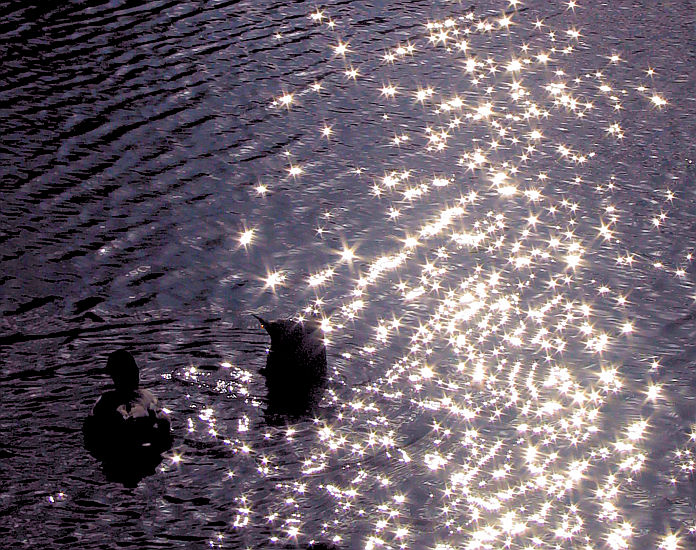
 Star artifact example. Click for larger picture.
I've had my G3 for a couple of months and shot some 1500 pictures with it. After I got a Canon A40 a year ago, and spent a lot of time with it, I decided to go for more pixels. At that time, the G2 would be a nice option for an upgrade, but now, a year later, there is also the G3. I went for the G3, mainly because of its lens: it has a 4x lens instead of a 3x. I want to have a camera that's a final replacement of my somewhat unwieldy SLR equipment. No more voluminous equipment and switching lenses. It seems to have worked. What do I do with my fridgeful of films?
The G3 an upgrade from my A40 in just about every respect. More pixels, longer and brighter lens, better macro abilities, shutter- and f- priority modes, better diaphragm, better batteries, rotation sensitivity, more buttons so that you have every function immediately at your fingertips.
The lens. I've been complaining about lens quality of many digital cameras, and this complaint is still current for various newer cameras. The G3 has a good lens, with acceptable distortions. While it has little red-green aberration, the biggest distortions are the blue fringes which occur around high contrast areas. Usually it's not much of a problem, and the fringes can be reduced by using a smaller aperture. However, in overexposed (especially cloudy) skies there are blue fringes around tree tops. These have to be removed by means of postprocessing.
A plus is the iris-like diaphraghm. It enables arbitrary aperture up to F/8. While digital cameras have a good DOF thanks to the short lenses, I sometimes find F/8 too little for macros at the closest end and for high DOF landscapes (with, say, a macro subject in front and a landscape in the background). The camera has nicer diaphragm artifacts than the A40. The shapes of confusion are no longer multiple concentric circles, but rather, smooth hexagrams. The lens flare artifacts look better. At extreme highlights, you get the `classic' six-pointed star artifacts, which are quite aesthetic, especially compared to the undefined more-or-less circular artifacts of the A40. Who needs a star filter anyway?
Star artifact example. Click for larger picture.
The TFT screen. The screen is movable and tiltable, and enables you to view your subject at odd angles, such as when taking pictures very close to the ground or very high up, or to avoid glare from the sun. In appropriate cases, it flips the display so that the image you see is not upside down. When you flip the screen onto the camera face up, it is like a `traditional' camera screen. When you flip it face down (a new feature of the G3 I think) it shuts itself off (saving batteries) and is safe from harm. Since the TFT screen is soft (you get display distortions when you apply pressure to the screen, like a TFT computer screen) I find it prudent to protect the screen this way when putting the camera in my bag. I am not sure how harmful this pressure is to the screen, but I find it a pity that the screen is not covered by a layer of hard plastic, as is my A40. When I am in the field, there's usually a lot of getting the camera out of the bag and putting it back in, so I find it most efficient to just open and close the screen, and never putting it face up onto the camera, as a traditional screen.
The user interface. In my A40 review, I said I wanted more buttons. Now, I got them. There's a button for every much-used function, so that there's little inconvenient mode switching. There's one gripe I have about the buttons though: the menu button is too close to the hand grip, and I often find myself pushing it accidentally.
A nice addition is the jog wheel, which functions in just about every mode the camera is in (though this is not always documented). In picture view mode, the wheel can be used to cycle through the pictures. Due to the camera's `fast preview' facility (showing just low-quality thumbnails without having to load the entire picture) you can quickly cycle through the pictures this way. The wheel is a little unresponsive in cases, when you turn it too fast, some of the wheel's ticks are not registered. This appears to be a software problem. It is not too much of a problem though, except when using manual focus in the macro range, where you have to exercise a lot of patience.
The manual focus is a nice feature, which I used mostly for close-range macros. First, you can autofocus, and then press the MF button to further precise your focus. A focus bracketing feature is also a help here. You can focus with help of a focus helper which zooms a detail of the picture enough to see if it's sharp. There's no such thing as the focus helper found in some SLRs, in which one focuses by looking at the alignment of the scene (i.e. out of focus translates to the different parts of the scene being shifted rather than blurred). I remember someone asked for a software upgrade to incorporate such a SLR-type focus helper. Not likely this will work, as the original SLRs used a block of calcite, which has very unusual optical properties.